The brief
The client came to me with a simple sounding problem: “our sales numbers do not match and we do not know why.”
They had been running the business for a few years. Data had accumulated in the way it usually does, which is to say one file per month, exported from different systems by different people, stored in a shared folder, with names like sales_2024_final.xlsx and sales_2024_final_updated.xlsx sitting next to each other.
Somebody had tried to build a summary in Excel. The totals did not agree with what the accountant had. Customer counts looked too high. Some months were missing entirely.
What they wanted was a single reliable dataset they could build reports on. What they needed, which is not the same thing, was to know what was wrong with the data in the first place, so it could stop happening.
I did both.
What “clean” actually meant here
Before writing any code, I asked a set of questions. This part takes an hour and saves a week.
- What is one row supposed to represent? (Answer: one line item on one order.)
- Which field uniquely identifies a row? (Answer: they thought order ID, which turned out to be wrong.)
- What counts as a real sale? Do cancelled orders count? Returns?
- Which fields must never be empty?
- When two records disagree, which system is the source of truth?
- What is the output going to be used for?
That last question changes everything. Data cleaned for a monthly revenue report is cleaned differently from data cleaned for a customer mailing list. Revenue work cares about amounts and dates. Mailing list work cares about names and contact fields.
Their answer was revenue reporting and basic customer analysis, so I optimised for amounts, dates and customer identity, and spent less time on fields like address lines.
I wrote the answers down in a short document and had them confirm it over email. Every business rule I applied later points back to a line in that document. When someone asks in six months why returns were excluded, there is an answer with a date on it.
The tools I used, and why
Nothing exotic here. Data cleaning does not need exotic.
Python 3.11. The language. I used a virtual environment per project so the client’s script does not break when I upgrade something for another job.
pandas. The core of the work. Everything from loading files to grouping, merging, deduplicating and exporting.
numpy. Mostly for np.where conditional logic and for handling NaN properly in numeric columns.
openpyxl. Reading .xlsx files and writing the final formatted workbook. This is also what lets you handle sheets, headers in odd positions and number formats.
rapidfuzz. String similarity matching. This is what found the duplicate customers whose names were spelled differently. It is much faster than the older fuzzywuzzy library and does the same job.
python-dateutil. Fallback date parsing for the small set of rows where the format was genuinely unpredictable.
Jupyter Notebook. For the exploration phase only. Notebooks are excellent for looking at data and terrible for anything that needs to run reliably every month.
Standard library logging and pathlib. For the final script. Print statements are fine in a notebook. A script that runs unattended needs a log file.
I did not use any data cleaning frameworks or AutoML tools. On a project this size they add more to learn than they save.
Step 1: Protect the raw data
The first thing I did was create a project structure and make the original files read only.
client-project/
├── data/
│   ├── raw/          # never touched, never edited
│   ├── interim/      # intermediate outputs
│   └── clean/        # final deliverables
├── notebooks/        # exploration
├── src/              # the final pipeline
├── reports/          # data quality reports
├── config/           # mapping files
└── requirements.txt
This sounds like bureaucracy. It is not. Halfway through a cleaning job you will always want to check what the original value was, and if you have been editing files in place you cannot.
Rule I never break: raw data is read only. Every transformation writes somewhere else.
Step 2: Take an inventory of what actually arrived
The client said “about 30 files”. There were 47.
python
from pathlib import Path
import pandas as pd

raw_dir = Path("data/raw")
rows = []

for path in sorted(raw_dir.rglob("*")):
    if path.suffix.lower() in {".csv", ".xlsx", ".xls"}:
        rows.append({
            "file_name": path.name,
            "extension": path.suffix.lower(),
            "size_kb": round(path.stat().st_size / 1024, 1),
        })

inventory = pd.DataFrame(rows)
print(inventory)
Then for Excel files, I listed the sheets, because several files had more than one and nobody had mentioned it:
python
for path in raw_dir.glob("*.xlsx"):
    xl = pd.ExcelFile(path)
    print(path.name, "->", xl.sheet_names)
This turned up three sheets named things like Sheet1 (2) containing data nobody knew was there, and two files that were actually the same month exported twice.
I sent the inventory back to the client before doing anything else. Their reaction was useful: they could immediately tell me which files were drafts and which were authoritative, which saved me from cleaning data that should never have been included.
Step 3: Load everything without losing information
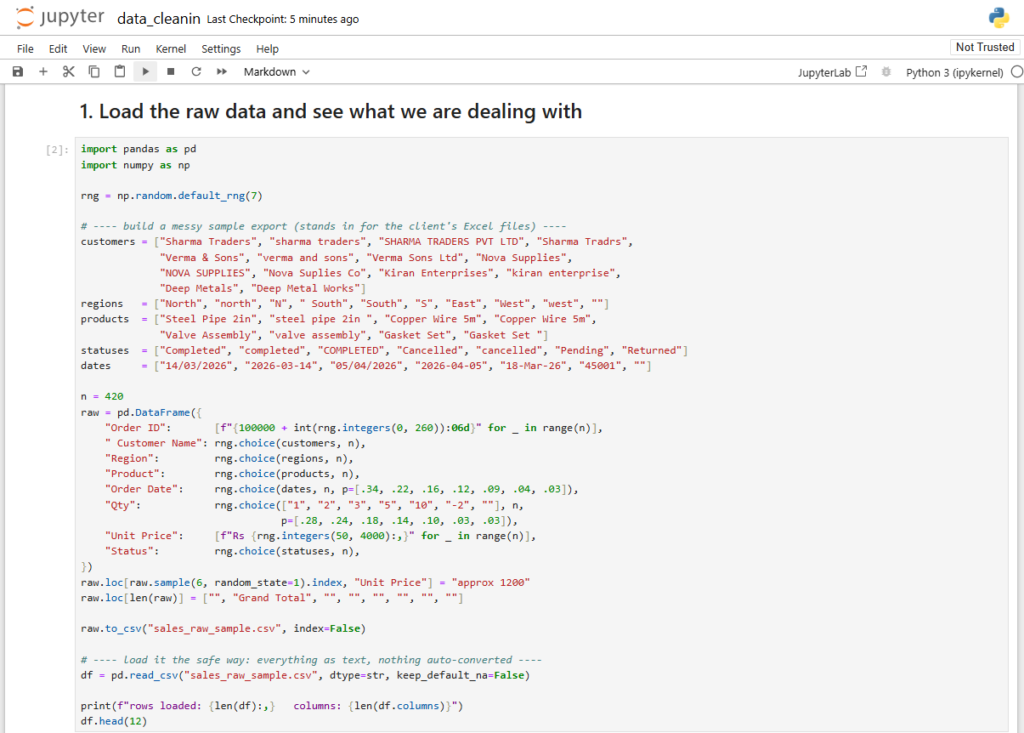
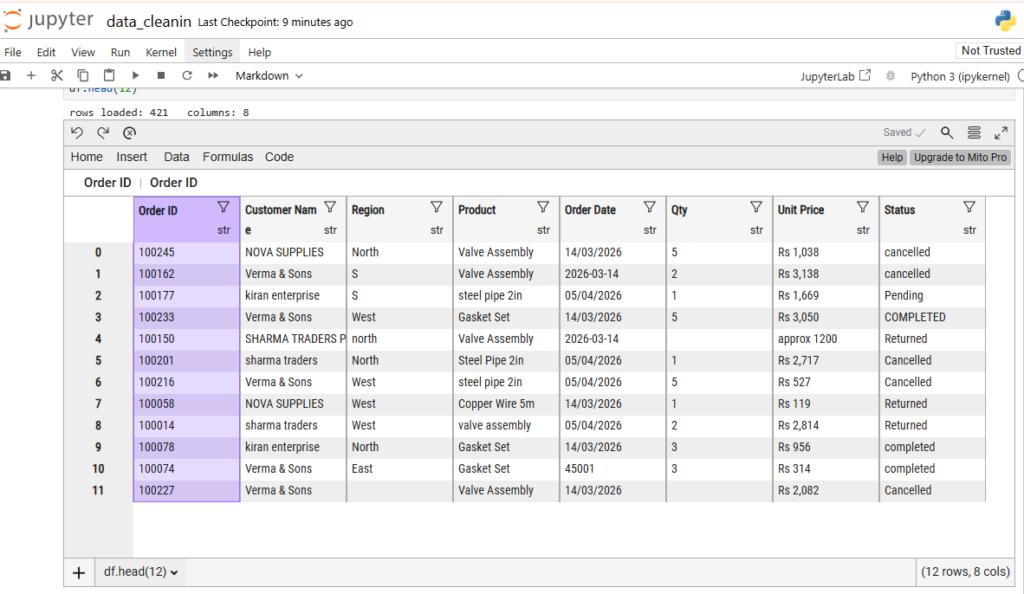
pandas tries to be helpful when reading files. That helpfulness is the enemy at this stage.
If you let it guess data types, an order ID like 00123 becomes the number 123 and the leading zeros are gone permanently. A column of mixed text and numbers becomes object with some values silently coerced.
So I loaded everything as text first:
python
def load_file(path):
    """Load a CSV or Excel file with everything as text."""
    if path.suffix.lower() == ".csv":
        try:
            df = pd.read_csv(path, dtype=str, keep_default_na=False, encoding="utf-8")
        except UnicodeDecodeError:
            df = pd.read_csv(path, dtype=str, keep_default_na=False, encoding="cp1252")
    else:
        df = pd.read_excel(path, dtype=str, keep_default_na=False)

    df["source_file"] = path.name
    return df
Two details worth pointing out.
keep_default_na=False stops pandas turning strings like NA, N/A and None into missing values before I have decided whether that is correct. Sometimes NA genuinely means “not applicable” and is information.
The encoding fallback exists because about a third of the CSVs had been exported from Windows and were not UTF-8. Without the fallback the script crashes on file 12 and you spend twenty minutes working out why.
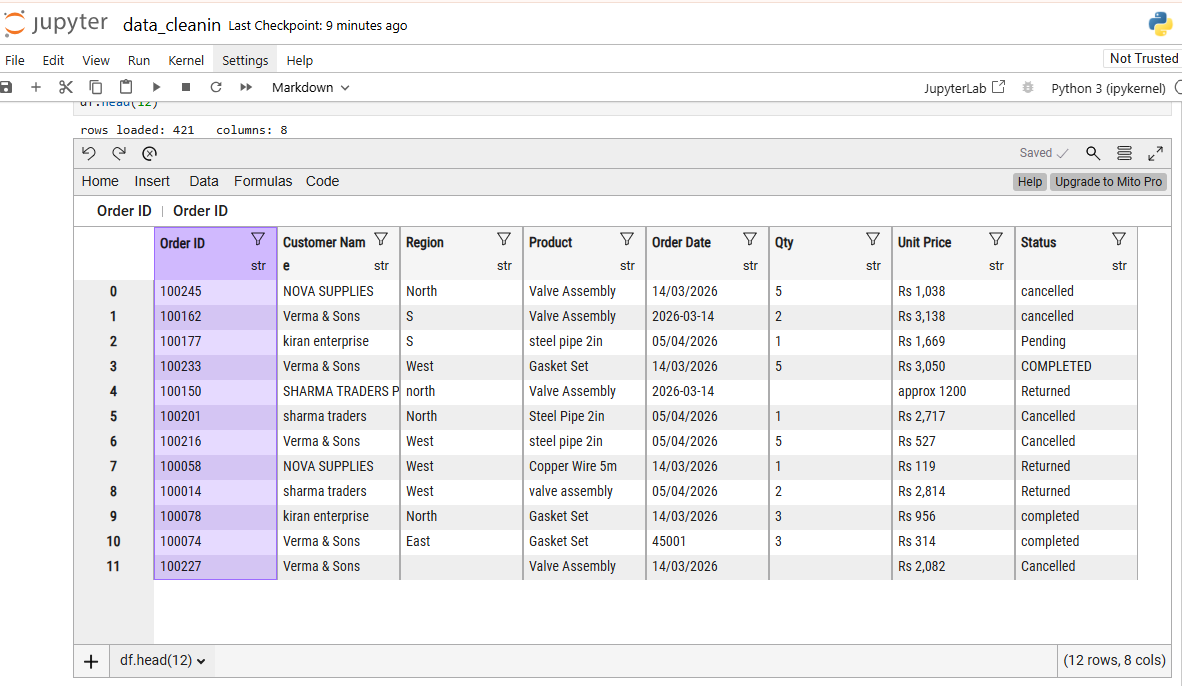
The header row problem
Several Excel files had a company logo, a title and two blank rows above the real header. pandas reads row zero as the header, so I got columns named Unnamed: 0, Unnamed: 1 and so on.
Rather than hardcoding a row number per file, I wrote a small function that finds the header:
python
def find_header_row(path, expected_keywords, max_scan=10):
    """Find the row index that looks most like a header."""
    preview = pd.read_excel(path, header=None, nrows=max_scan, dtype=str)

    for idx, row in preview.iterrows():
        values = [str(v).strip().lower() for v in row.tolist()]
        matches = sum(1 for kw in expected_keywords if kw in values)
        if matches >= 2:
            return idx

    return 0

header_row = find_header_row(path, ["order id", "date", "amount", "customer"])
df = pd.read_excel(path, header=header_row, dtype=str)
It scans the first ten rows and picks the one containing at least two expected column names. Simple, and it handled 45 of the 47 files. The other two I loaded manually with an explicit header argument.
Step 4: Combine everything into one table
python
frames = []

for path in sorted(raw_dir.rglob("*")):
    if path.suffix.lower() in {".csv", ".xlsx", ".xls"}:
        frames.append(load_file(path))

df = pd.concat(frames, ignore_index=True, sort=False)
print(f"combined rows: {len(df):,}")
print(f"columns: {df.columns.tolist()}")
ignore_index=True rebuilds a clean index. Without it you get repeated index values, which cause confusing problems later.
The source_file column added during loading is important. When I found a strange value later, I could immediately trace it back to the file it came from, and often that explained it. One file had been exported with a different currency setting, and the source column is how I found out.
The combined column list showed the first real problem: the same field appeared under four different names across files. Customer, Customer Name, customer_name and CustomerName were all the same thing.
Step 5: Standardise the column names
python
df.columns = (
    df.columns
    .str.strip()
    .str.lower()
    .str.replace(r"[^\w\s]", "", regex=True)
    .str.replace(r"\s+", "_", regex=True)
)

column_map = {
    "customername": "customer_name",
    "cust_name": "customer_name",
    "client_name": "customer_name",
    "invoice_no": "order_id",
    "order_no": "order_id",
    "qty": "quantity",
    "rate": "unit_price",
    "amt": "amount",
}

df = df.rename(columns=column_map)
The automatic part handles casing and spaces. The manual map handles genuine synonyms, which no automatic rule can guess safely.
I kept the map in a config file rather than in the code, so the client can add to it when a new export introduces yet another name.
After renaming, I collapsed columns that had ended up duplicated:
python
duplicate_cols = df.columns[df.columns.duplicated()].unique().tolist()
print("duplicated column names:", duplicate_cols)
Step 6: Profile the data before changing anything
This is the step people skip, and skipping it is why cleaning takes three times longer than it should.
python
print(df.shape)
print(df.isna().mean().sort_values(ascending=False).head(15))

for col in ["customer_name", "region", "product", "status"]:
    print(f"\n--- {col} ---")
    print(df[col].value_counts(dropna=False).head(25))
That frequency count is the single most useful thing in this entire project. In one screen it showed me:
Statushad seven values where the client believed there were threeRegionhad casing variants plus three single letter codesProducthad trailing spaces on about 8% of rows- Roughly 900 rows had
customer_nameas an empty string, which is different from missing
I also checked the edges of every numeric and date column:
python
summary = pd.DataFrame({
    "non_empty": df.apply(lambda s: (s.astype(str).str.strip() != "").sum()),
    "distinct":  df.nunique(dropna=False),
    "sample":    df.apply(lambda s: s.dropna().astype(str).head(3).tolist()),
})
print(summary)
Looking at three sample values per column tells you more about the real format than any summary statistic.
Step 7: Remove the structural junk
Excel exports carry things that are not data.
Total rows at the bottom of each file. These had the word “Total” in the customer column and no order ID. They would have double counted every month’s revenue.
python
df = df[~df["customer_name"].str.strip().str.lower().isin(["total", "grand total", "subtotal"])]
df = df[df["order_id"].str.strip() != ""]
Fully empty rows left behind by spacing in the original sheets:
python
df = df.dropna(how="all")Merged cell artefacts, where a value appears once and the rows below it are blank because the original sheet merged them visually. Forward filling fixes this, but only do it where you have confirmed the merge existed:
python
df["region"] = df["region"].replace("", pd.NA).ffill()That ffill is a business decision, not a technical one. I confirmed with the client that the blank rows belonged to the region above before applying it. Applied blindly, forward filling silently invents data.
Step 8: Deduplicate, in two passes
Pass one: exact duplicates
python
print("exact duplicate rows:", df.duplicated().sum())
df = df.drop_duplicates()
This removed about 2,400 rows, most of them from those two files that had been exported twice.
Pass two: business duplicates
The client believed order_id was unique. It was not, because an order with three products has three lines. Assuming uniqueness and deduplicating on order ID alone would have deleted real sales.
The actual unique key was order ID plus product:
python
dupes = df[df.duplicated(subset=["order_id", "product"], keep=False)]
dupes.sort_values(["order_id", "product"]).head(20)
Looking at those rows showed genuine duplicates where the same line had been entered twice, distinguishable because one had a later modified timestamp. I kept the later one:
python
df = (
    df.sort_values("modified_at")
      .drop_duplicates(subset=["order_id", "product"], keep="last")
)
Being explicit about the sort matters. Without it, keep="last" just means whichever row happened to appear later in the file, which is arbitrary.
Step 9: Find the duplicate customers
This was the reason their customer count looked inflated. The same business appeared as Sharma Traders, sharma traders, Sharma Traders., Sharma Trading Co and SHARMA TRADERS PVT LTD.
First, normalise the obvious differences:
python
df["customer_key"] = (
    df["customer_name"]
    .str.strip()
    .str.lower()
    .str.replace(r"[^\w\s]", "", regex=True)
    .str.replace(r"\s+", " ", regex=True)
    .str.replace(r"\b(pvt|ltd|limited|co|company|inc)\b", "", regex=True)
    .str.strip()
)
That alone collapsed several hundred variants.
Then, for the remaining near matches, I used rapidfuzz to generate candidate pairs:
python
from rapidfuzz import process, fuzz

unique_names = sorted(df["customer_key"].dropna().unique())
candidates = []

for name in unique_names:
    matches = process.extract(
        name,
        unique_names,
        scorer=fuzz.token_sort_ratio,
        limit=5,
        score_cutoff=88,
    )
    for matched_name, score, _ in matches:
        if matched_name != name:
            pair = tuple(sorted([name, matched_name]))
            candidates.append({"name_a": pair[0], "name_b": pair[1], "score": score})

review = (
    pd.DataFrame(candidates)
    .drop_duplicates()
    .sort_values("score", ascending=False)
)

review.to_excel("reports/customer_match_review.xlsx", index=False)
The important part: I did not merge these automatically.
Fuzzy matching at 88% similarity is a good filter and a terrible decision maker. Sharma Traders and Sharma Trading might be the same business or two different ones, and no algorithm knows. So the output went to the client as a review sheet with a blank “same customer, yes or no” column.
They filled it in over two days. Their answers became a mapping file, and the mapping file went into the pipeline:
python
mapping = pd.read_csv("config/customer_mapping.csv")
name_lookup = dict(zip(mapping["raw_key"], mapping["canonical_name"]))

df["customer_clean"] = df["customer_key"].map(name_lookup).fillna(df["customer_name"].str.strip())
The customer count dropped by roughly a fifth. That single finding was worth more to them than everything else in the project, because their repeat purchase rate had been understated for years.
Step 10: Fix the dates
The date column was text, in at least three formats.
python
parsed_a = pd.to_datetime(df["order_date"], format="%d/%m/%Y", errors="coerce")
parsed_b = pd.to_datetime(df["order_date"], format="%Y-%m-%d", errors="coerce")
parsed_c = pd.to_datetime(df["order_date"], format="%d-%b-%y", errors="coerce")

df["order_date_clean"] = parsed_a.fillna(parsed_b).fillna(parsed_c)

unparsed = df["order_date_clean"].isna() & (df["order_date"].str.strip() != "")
print("unparsed dates:", unparsed.sum())
print(df.loc[unparsed, "order_date"].value_counts().head(20))
Parsing in explicit passes rather than letting pandas infer is deliberate, and it is the most important technical decision in this whole project.
Here is why. 03/04/2026 is 3 April in one convention and 4 March in another. If you let pandas infer the format, it can interpret different rows differently depending on what it sees. Data silently shifts by months, everything still looks valid, and nobody notices until a quarterly total is wrong.
I confirmed with the client that their export used day first, then applied it explicitly. The 60 rows that failed all three formats were listed out, checked by hand, and turned out to be Excel serial numbers that had lost their formatting:
python
serial_mask = df["order_date"].str.match(r"^\d{5}$", na=False)
df.loc[serial_mask, "order_date_clean"] = pd.to_datetime(
    df.loc[serial_mask, "order_date"].astype(int),
    unit="D",
    origin="1899-12-30",
)
That 1899-12-30 origin is the Excel date epoch, and it comes up often enough to be worth remembering.
Step 11: Fix the numbers
Amounts were stored as text with currency symbols, thousands separators and, in a few rows, a trailing space and the word “approx”.
python
def clean_numeric(series):
    return pd.to_numeric(
        series.astype(str)
              .str.replace(r"[^\d.\-]", "", regex=True)
              .str.strip()
              .replace("", pd.NA),
        errors="coerce",
    )

df["quantity"] = clean_numeric(df["quantity"])
df["unit_price"] = clean_numeric(df["unit_price"])
df["amount"] = clean_numeric(df["amount"])

for col in ["quantity", "unit_price", "amount"]:
    print(col, "unparseable:", df[col].isna().sum())
Then the cross check that found a real problem:
python
df["calculated_amount"] = df["quantity"] * df["unit_price"]
mismatch = (df["amount"] - df["calculated_amount"]).abs() > 1

print("rows where amount does not match qty x price:", mismatch.sum())
df.loc[mismatch, ["order_id", "quantity", "unit_price", "amount", "calculated_amount"]].head(20)
About 700 rows did not reconcile. Most were discounts applied at the line level and stored nowhere else, which the client confirmed. A handful were genuine typing errors, like a unit price entered with an extra zero.
I did not overwrite the stored amount. I kept both columns and flagged the difference, because deciding which one is correct is the client’s call, not mine.
Step 12: Handle missing values on purpose
There is no universal rule here. It depends entirely on why the value is missing.
python
# rows with no order id or no date are unusable for revenue reporting
before = len(df)
df = df.dropna(subset=["order_id", "order_date_clean"])
print(f"dropped {before - len(df)} rows missing key fields")

# a missing discount genuinely means no discount
df["discount"] = df["discount"].fillna(0)

# a missing region is unknown, and should stay visible as unknown
df["region"] = df["region"].replace("", pd.NA).fillna("Unknown")

# a missing unit price is not something I can invent
# left as NaN deliberately
That last one matters. Filling a missing price with the column average makes your dataset look complete and your analysis wrong. NaN is honest, and pandas skips it in aggregations anyway.
Whatever you choose, print the counts before and after. Silent filling is how cleaned data becomes fabricated data.
Step 13: Build the exceptions report
This became the most valuable deliverable of the project, and it was not in the original brief.
Instead of quietly dropping bad rows, I collected every row that failed a rule and exported it with the reason attached:
python
exceptions = []

def flag(mask, reason):
    if mask.any():
        subset = df.loc[mask].copy()
        subset["exception_reason"] = reason
        exceptions.append(subset)

flag(df["amount"].isna(), "amount could not be parsed")
flag(df["quantity"] < 0, "negative quantity")
flag(df["order_date_clean"] > pd.Timestamp.today(), "order date in the future")
flag(df["order_date_clean"] < "2015-01-01", "order date before business started")
flag((df["amount"] - df["calculated_amount"]).abs() > 1, "amount does not match quantity times price")
flag(df["customer_clean"].isna(), "missing customer name")

exceptions_df = pd.concat(exceptions, ignore_index=True) if exceptions else pd.DataFrame()
exceptions_df.to_excel("reports/exceptions.xlsx", index=False)

print(f"{len(exceptions_df)} rows flagged across {exceptions_df['exception_reason'].nunique()} rule types")
The client’s operations person went through this file and fixed most of the issues at source, in their actual system. That means next month’s export is cleaner, which is a permanent improvement rather than a one time fix.
Cleaning data helps once. Telling people exactly what is broken and where helps forever.
Step 14: Produce the outputs
Three deliverables.
A clean dataset as CSV for anything programmatic, and as a formatted Excel file for the humans:
python
output_cols = [
    "order_id", "order_date_clean", "customer_clean", "region",
    "product", "quantity", "unit_price", "amount", "discount", "source_file",
]

clean = df[output_cols].rename(columns={
    "order_date_clean": "order_date",
    "customer_clean": "customer_name",
})

clean.to_csv("data/clean/sales_clean.csv", index=False)

with pd.ExcelWriter("data/clean/sales_clean.xlsx", engine="openpyxl") as writer:
    clean.to_excel(writer, sheet_name="Clean Data", index=False)
    exceptions_df.to_excel(writer, sheet_name="Exceptions", index=False)
A data quality summary showing what was found and what was changed, one line per check, with counts.
The script itself, so they are not dependent on me every month.
Step 15: Make it repeatable
The notebook was for exploration. The deliverable was a script.
python
import logging
from pathlib import Path

logging.basicConfig(
    filename="logs/cleaning.log",
    level=logging.INFO,
    format="%(asctime)s | %(levelname)s | %(message)s",
)

def main():
    logging.info("starting run")
    df = load_all(Path("data/raw"))
    logging.info("loaded %d rows from %d files", len(df), df["source_file"].nunique())

    df = standardise_columns(df)
    df = remove_structural_junk(df)
    df = deduplicate(df)
    df = clean_customers(df)
    df = clean_dates(df)
    df = clean_numbers(df)

    validate(df)
    export(df)
    logging.info("finished, %d clean rows", len(df))

if __name__ == "__main__":
    main()
With hard checks that stop the run rather than producing a quietly wrong file:
python
def validate(df):
    assert len(df) > 0, "no rows survived cleaning"
    assert df["order_date"].notna().all(), "unparsed dates present in output"
    assert not df.duplicated(subset=["order_id", "product"]).any(), "duplicate line items"
    assert (df["quantity"] >= 0).all() or ALLOW_RETURNS, "negative quantities present"
A script that crashes tells you something changed upstream. A script that runs happily and produces a smaller number than last month tells you nothing until it is too late.
Problems I ran into
Two files were password protected. The client did not know the passwords. We tracked down the former employee who had created them.
One file was a PDF renamed to .xlsx. It opened in Excel with a warning that everyone had been clicking through for two years.
Regional settings. One machine exported with a comma as the decimal separator. Caught it through the source file column when one month’s amounts looked a thousand times too small.
Scope creep. Halfway through, the client asked whether I could also build a dashboard. Good sign, but I finished and handed over the cleaning work first, then quoted separately. Mixing them would have meant neither was finished properly.
Results
- One consolidated dataset replacing 47 scattered files
- Duplicate line items removed, with the removals documented rather than silent
- Customer count corrected after merging spelling variants, which changed their repeat purchase picture significantly
- An exceptions report the operations team now works through monthly
- A script that reruns the entire process in under a minute
(Add your real figures before publishing: exact row counts, how many duplicates, percentage change in customer count, time saved. Specific numbers are what make a case study credible.)
What I would do differently
Ask about the source systems earlier. I spent two days cleaning symptoms of an export setting that could have been changed at the source in five minutes.
Build the exceptions report first. It ended up being the most valuable output, and having it earlier would have shortened every conversation about business rules.
Version the mapping files. The customer mapping changed three times during the project. A simple dated copy each time would have made it easier to explain why a number moved between two of my drafts.
Takeaways if you are doing similar work
- Never edit the raw files. Ever.
- Load everything as text, then convert deliberately.
- Profile before you change anything. Frequency counts find most problems.
- Duplicates come in two kinds and need different handling.
- Never let a machine decide which customers are the same. Generate candidates, let a human confirm.
- Parse dates with explicit formats. Inference will eventually shift your data silently.
- Flag problems in an exceptions report instead of quietly dropping rows.
- End with a script, not a notebook.
Most of a data cleaning project is not clever code. It is asking the right questions at the start, checking your assumptions against the data, and being honest about what you changed.
Have data that needs sorting out? Get in touch.